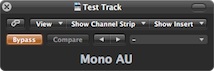
Function as Mono button of an analog mixing console in a DAW.
Can be inserted in any stereo track, preferedly Stereo Mix.
Helps aurally double-check the phase integrity of a stereo track.
Also serves as tutorial on how to insert own specific math and
GUI code into generic Audio Unit framework.
This code explains how to exchange and mix data between different concurrently running audio channels,
which hasn't been covered in the AU framework API documentation so far.
Description:
It was written because most modern DAWs happend to have omitted this old-style control
which used to be quite valuable in the mixing decision-making.
Interface
The only interface is the Bypass button of the host application
In case you prefer something musically useful, this
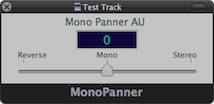
is a slightly more elaborate version. It plugs into a stereo track and can smoothly pan
the signal from Stereo through Mono to Reverse-stereo and vice-versa,
making use of modern DAW track automation as well:
The interface is self-explanatory
Pan value 1 : Stereo
Pan value 0 : Mono
Pan value -1 : Reverse-stereo
Installation
Just unzip and drag to either of the following folders:
/Library/Audio/Plug-ins/Components
~/Library/Audio/Plug-ins/Components
The plug-ins have been built and tested in OSX 10.7.5. up to macOS 10.14.6